Our docs chatbot struggled with a question that sounded straightforward: “How many templates does AGNT5 have?” Every template had a page in the docs. The assistant still couldn’t give the total.
We kept search and added a read-only shell: a tool for running commands that find and read documentation files. This gave the agent more ways to gather context, the information it reads before answering.
Getting the right context
We started with hybrid retrieval-augmented generation (RAG), which combines two kinds of search. Dense retrieval matches meaning using embeddings, numerical representations of text. Sparse retrieval adds word and identifier matches.
We combined their results and passed the top-k excerpts to the model: the k results ranked most relevant to the question.
This gave us a way to find passages when a reader used either an API name or different wording from the docs. But finding relevant passages did not always provide enough context.
Different questions need different context. An API parameter may need one passage. Explaining how features work together may require several pages. Listing every template needs the complete collection. The documentation can contain the answer while the retrieved excerpts leave part of it out.
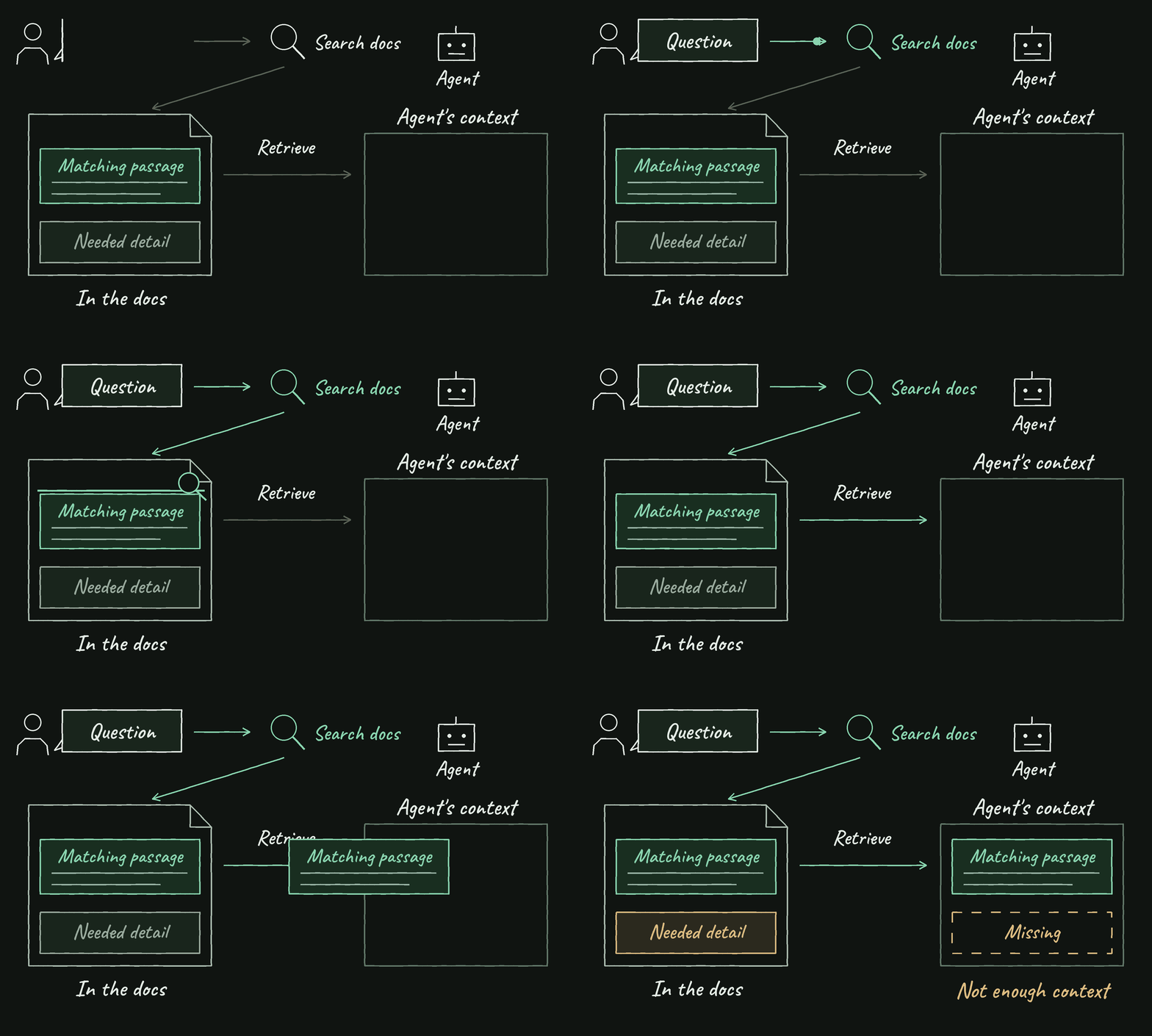
The template-count question illustrated this gap. In the recorded search-only run, the agent searched for AGNT5 templates count with top_k: 5. It found related documentation but said the total was not explicitly documented. Several matching excerpts could come from one page; others could mention templates without being template pages. Increasing k could retrieve more, but it would not establish that the collection was complete.
We wanted the assistant to gather more context when it needed it: inspect a collection, read a full page, or search for another explanation. Hybrid search would remain useful. The next step was giving the agent more ways to look through the docs before answering.
Giving the agent access to the docs
Our documentation already lived in Markdown and MDX, a format that adds interactive components to Markdown. Directories grouped related pages, filenames identified topics, and each page kept its explanations and examples together.
We gave the agent read-only access to those files. It could list a directory to inspect a collection, use grep to locate an exact identifier, or read a page for the surrounding explanation. These operations gave it more control over which documentation it brought into context.
Mintlify explored a related approach through a virtual filesystem backed by Chroma. Our setup uses a copy of the documentation on the worker that runs the agent’s tools.
Search remained available when the agent did not know which page or phrase to look for. Together, search and filesystem access gave it ways to discover relevant information and inspect it further.
Two ways to gather context
We gave the agent two tools:
docs_shell- Finds terms and reads pages using restricted commands, includinggrep,find, andcat.search_docs- Finds relevant excerpts through the existing hybrid search index.
Both return documentation text, source references, and any error. That means the agent can combine evidence from a page read with evidence from search.
We also give it an inventory of page paths and titles. If it already knows the page it needs, it can open it. The inventory helps it plan a read; it still has to check the page content before answering.
Let the question decide what you need to read
Use the information needed for an answer to decide what to read. These examples came from our test questions and agent instructions.
A count needs the whole collection
For the same template-count question, the combined version made one filesystem call. It ran this read-only command inside the docs tool, where paths are relative to the documentation root:
grep -H "^title:" templates/*.mdxThe command returns matching title lines with filenames. Here is its output reproduced from our docs checkout:
templates/code_reviewer.mdx:title: "Code Reviewer"
templates/coding_agent.mdx:title: "Coding Agent"
templates/hitl_deep_research.mdx:title: "HITL Deep Research"
templates/quickstart.mdx:title: "Quickstart"
templates/travel_booking_customer_service.mdx:title: "Customer Service Assistant"
templates/tutor_agent.mdx:title: "Tutor Agent"
templates/weather-agent.mdx:title: "Weather Agent"
In the recorded run, the agent answered with a count of seven, listed the template names, and linked all seven pages. It had inspected the collection instead of looking for a passage that stated the total.
Check what each file represents: an overview page isn’t another template. The filename pattern templates/*.mdx only covers that directory, so it misses nested pages. It fits our flat collection; your docs layout may need a different command.
An exact name gives you somewhere to start
For a question naming an API object, a literal search can find its definition. Reading the surrounding section then gives the agent the fields, examples, and constraints needed to explain it.
A matching name alone is not enough. It might appear in a changelog or an example without an explanation. The agent needs the passage that supports the answer.
A conceptual question may need search
A reader may describe a behavior without knowing the name used in the documentation. Searching files for their exact phrase can return nothing even when a relevant page exists.
We kept semantic search for these cases. After an unhelpful filesystem attempt, the agent can search for an explanation, use the excerpts, and open a returned page if it needs more detail.
A grep command that finds no matches is a reason to try another search. It doesn’t prove the docs have no answer.
A follow-up can reuse known pages
Our evals also included “Can you explain each?” after a question about templates. The agent needs the earlier turn to understand “each,” then the template pages to explain them.
Our instructions encourage reading the known pages together. Searching again for every item adds work when the agent already has the paths. The previous answer tells it where to look; the new reads supply the detail.
The combined version used both filesystem tools and semantic search on 9 of the 29 questions in our comparison. Those included questions about RetryPolicy, command-line interface (CLI) installation, and prompt caching. Keeping both tools gave the agent another way to look when its first attempt wasn’t enough.
Set limits on tool use
Our implementation requires a shell attempt before semantic search can run. If the model calls search first, the tool returns a message asking it to try the filesystem. We also reject duplicate search queries and allow up to 2 semantic searches per run.
Within that policy, the agent chooses what to read and what to search for. We have not established that starting with the shell is right for every question. A conceptual question may pay for a filesystem attempt before reaching search. Letting the agent choose either tool first is something to compare, not a result we have already demonstrated.
We limited the shell too. The tool checks commands against an allowed set, restricts paths to docs collections, and caps execution time and output. It also restricts write operations and command options.
Those output limits matter to the answer. If a read is cut short, the model cannot treat it as the full collection. And if the local docs and search index contain different versions, the tools can return conflicting information. Keeping both views current is part of running this design.
The docs are available as files on the worker and through the search index. Our current policy starts with a filesystem attempt, then permits search to fill gaps. The agent can use both paths before answering.
Measure answer quality and latency
We wanted to check whether adding filesystem access helped the assistant answer docs questions. On August 4, 2026, we ran both versions once on the same 29 questions, with the same scoring rules. The set covered lookups, explanations, lists, follow-ups, and questions the docs could not answer.
Each test question had a reference answer and, where relevant, expected documentation pages. We used two scorers:
- Answer correctness (
answer_correctness) - A large language model (LLM) judged the response against the reference answer. Correct (1) and mostly correct (0.75) grades passed. Mostly correct meant the core answer was right but a secondary detail could be missing; lower grades failed. - Expected source cited (
gold_page_cited) - A check compared cited page paths with the expected pages. Citing at least one expected page passed. This checked the source match; it didn’t verify support for every claim.
| What we checked | Search-only | Search + filesystem | Observed change |
|---|---|---|---|
| Answer judged correct or mostly correct | 22/29 (75.9%) | 26/29 (89.7%) | +13.8 percentage points |
| At least one expected page cited | 19/23 (82.6%) | 22/23 (95.7%) | +13.0 percentage points |
| Answer latency (average) | 26.2s | 12.30s | 53.1% lower across the two samples |
Source results cover the 23 questions with expected pages, excluding 6 that automatically passed because no source was required. Percentages are rounded. Quality uses the 29-question eval; latency compares a team-verified baseline with 30 separate completed runs, not a controlled speed comparison.
TL;DR
- Give the agent ways to gather missing context. Relevant excerpts may be enough for one question; another may need a full page or collection.
- Keep search and filesystem tools available. Search finds relevant passages; file access lets the agent read pages and inspect collections. Our current policy requires a filesystem attempt before search.
- Evaluate the answers those tools produce. In our 29-question test, answer checks passed increased from 22 to 26. Use the same questions to check whether a change helps your assistant.