Prompt caching can cut your LLM costs, but most teams either don’t use it, use it wrong, or default to whatever their provider does automatically without knowing there’s a better option for their specific use case.
It only works if part of your prompt stays exactly the same across calls, and that part is long enough to meet the provider’s minimum. If nothing repeats, there’s nothing to cache.
This is a guide to two decisions. First, whether your workload should be cached at all. Second, which mode to use, automatic or explicit, on OpenAI, Anthropic, and Gemini.
Caching is not free savings
The mental model most people carry is “turn it on, pay less.” That is only half true. Caching pays off when your prompt has a chunk that is reused, byte for byte, across many calls, and that chunk is large enough to clear the model’s minimum. If either condition fails, you pay full price, and on some models you pay a write premium on top of it.
Under the hood, the provider saves the model’s intermediate key-value (KV) states for the start of the prompt, so the next request with the same prefix skips recomputing them. It stores tensors, not text, and it does not change what the model generates. Because it is a prefix, one changed byte near the top breaks everything after it. That failure is the one that shows up in production, and we come back to it at the end.
When caching helps, and when it does not
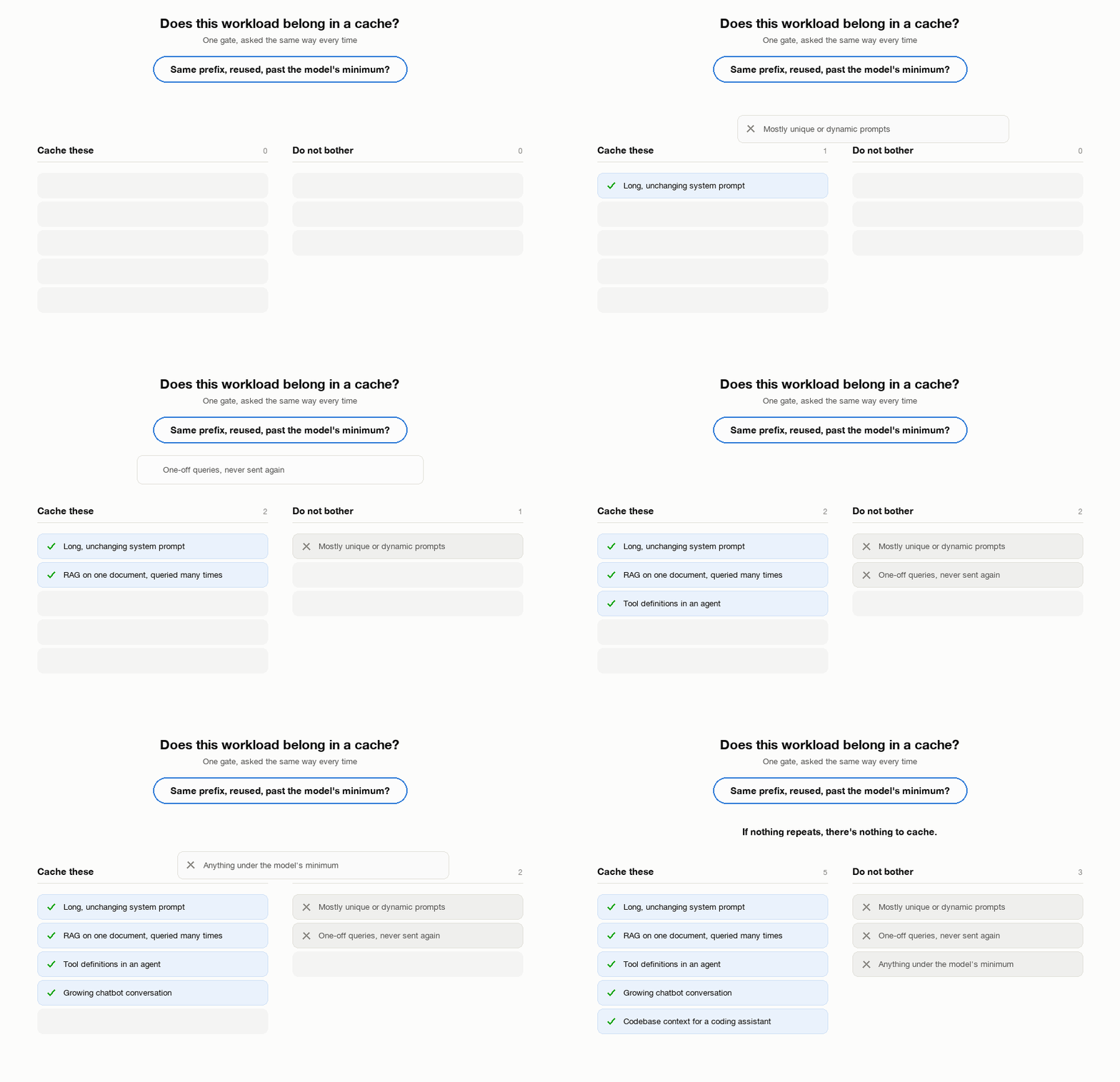
Cache these.
- A long, unchanging system prompt or persona
- RAG where the same retrieved document is queried several times
- Tool definitions in an agentic workflow
- A growing chatbot conversation, where each turn appends to the last
- Codebase context for a coding assistant
Do not bother with these.
- Prompts that are mostly unique or dynamic content, with nothing stable at the front
- One-off queries you will never send again with the same prefix
- Anything under the model’s minimum cacheable length, where caching does not activate at all
The minimum is the one people miss. It varies by provider and by model within a provider, and a prefix that qualifies on one model can fall short on another.
Automatic or explicit
Every provider now offers both modes.
Automatic means zero extra code. The provider decides what to cache, usually by placing a boundary at the end of the latest message. It works well for the common shape, a stable prefix followed by a growing conversation. But you cannot verify in advance what got cached, and if the last message contains dynamic content, the boundary lands after it and the cache never hits.
Explicit means you mark exactly what to cache. More setup, but you know the boundary, you can inspect it, and it handles prompt shapes automatic mode gets wrong, like a stable block followed by a dynamic block followed by the question.
Use explicit when you need a guaranteed hit. Use automatic when best-effort is enough.
Per provider, when to reach for which mode
OpenAI
Automatic is the default and it takes no effort if your prefix is stable and clears 1,024 tokens on GPT-5.6+. For a chatbot or a simple agent that appends turns, leave it on.
Reach for explicit (prompt_cache_breakpoint, GPT-5.6 and later) when “probably cached” is not good enough. The documented case is a static developer message followed by a dynamic user message. Automatic mode writes the cache through the dynamic content, so the next request with a different user message does not match. An explicit breakpoint after the static block fixes it.
Anthropic
Start with automatic for a simple chat app. One top-level cache_control field, and the boundary follows the conversation.
Switch to explicit when you have several pieces that change at different rates. Tool definitions that never change, a system prompt that changes weekly, a document that changes daily. With one automatic boundary, updating the document forces everything to be rewritten. With separate explicit breakpoints, up to four per request, updating the document only invalidates that piece. Also go explicit when you need to know exactly what is cached, for cost predictability or for debugging a hit rate that does not match the dashboard.
Gemini
Go explicit once your prefix clears 4,096 tokens. Create a CachedContent object once, reference it by name, and every later call reads from it. Storage bills hourly whether you use it or not, but in our run it never cancelled the read discount. Explicit was cheaper at every size we tested, from 4,595 to 92,589 tokens.
Implicit needs no setup and passes the discount through when it hits. On Gemini 3.8 Flash it never hit, across five calls at 8,000 tokens. It is the only option on the newer Interactions API, because explicit caching exists only on the legacy generateContent API.
Decision guide by use case
| Use case | Mode |
|---|---|
| Chatbot with a long system prompt | Automatic on OpenAI and Claude. Explicit on Gemini past 4,096 tokens |
| Multi-turn conversation | Automatic. Explicit if sections change at different rates |
| RAG over one big document, queried many times | Explicit, on Claude or Gemini |
| Agentic tool-use pipeline | Explicit. Tool schemas are stable and worth isolating |
| One-off scripts and prototypes | Do not cache |
Provider numbers
From the provider docs, checked against the live pages on 2026-09-14. On all three providers, automatic and explicit share the same minimum token threshold, so the mode choice never changes whether a prefix qualifies.
| OpenAI | Anthropic | Gemini | |
|---|---|---|---|
| Minimum cacheable tokens | 1,024 on GPT-5.6+. Earlier models are implicit-only and the minimum varies by request settings | 512 on the newest models, including Opus 5. 1,024 on Sonnet 5 and Opus 4.8. Up to 4,096 on Opus 4.5, Opus 4.6, and Haiku 4.5. Full list in the docs | 4,096 on Gemini 3.x Flash and 3.1 Pro Preview. 2,048 on Gemini 2.5. Same for implicit and explicit |
| Cached read | 0.1x input | 0.1x input. 0.025x on Fable 5.1 and Mythos 5.1 | 0.1x input |
| Cache write | 1.25x input on GPT-5.6+. No charge on earlier models | 1.25x input for 5-minute TTL. 2x input for 1-hour TTL | Not separately charged |
| Storage | None | None | ~$0.50 per MTok per hour on Flash through 2026 (doubling to $1.00 in January), ~$4.50 on Pro, billed while the object exists |
| Default cache lifetime | 30 minutes, refreshed on reuse | 5 minutes, refreshed on reuse. 1 hour available | 1 hour, adjustable, no fixed cap |
| Manual clear | Not available | Not available | Yes, caches.delete() |
| Representative input price | Sol $4, Terra $2, Luna $0.20 per MTok, short-context tier | Opus 5 $5, Sonnet 5 $2, Haiku 4.5 $1 per MTok | Gemini 3.8 Flash $0.75 through 2026 ($1.50 from January) |
The documented floor is not always the enforced one. A forum report shows an explicit cache of 1,024 tokens created on Gemini 3.1 Pro Preview against the documented 4,096, with no official response as of this writing.
OpenAI and Anthropic charge a write premium and nothing for storage, so their break-even is whether a prefix gets read more than about once. Gemini swaps the write premium for a storage meter.
Every price above comes from the provider’s own pricing page. We started with a third-party blog instead, which listed GPT-5.6 Sol input at $5.00 per MTok against the official $4.00, and we caught it before it reached this table. Check the live page even when a number looks settled. Any exact figure here is stale within weeks, whatever its source. The multipliers are the stable part.
Setup
All runs were on 2026-09-14 against Claude Opus 5 (claude-opus-5), GPT-5.6 Sol (gpt-5.6-sol), and Gemini 3.8 Flash (gemini-3.8-flash), through the anthropic 0.109.2, openai 2.41.0, and google-genai 2.8.0 Python SDKs.
The reusable prefix is a sample Master Service Agreement between two fictional companies, Acme Technologies and GlobalCorp Enterprises. It has 15 articles, from definitions and fees through liability, indemnification, non-solicitation, and auto-renewal, and runs 28,360 characters, which Claude Haiku 4.5 counted as 6,224 tokens. We truncated or repeated it to reach each target size. It sits behind one system instruction, “You are a legal analyst. Analyze the provided service agreement and answer questions accurately.”
The five questions, sent in this order after the prefix:
- What are the termination clauses in this agreement?
- Summarize the liability and indemnification provisions.
- Are there any auto-renewal terms? What are the notice periods?
- What are the payment terms and late payment penalties?
- Identify any non-compete or non-solicitation clauses.
- Sizes. 400, 2,000, and 8,000 target tokens, chosen to sit under all three minimums, between them, and above all three (512 on Opus 5, 1,024 on GPT-5.6, 4,096 on Gemini 3.8 Flash).
- Sessions. Each cell sends the same prefix through the five questions in one session. Call 1 is the cold write, calls 2 through 5 are the reads.
- Output cap. 512 tokens per call.
- Gemini thinking. Off, so its output count equals its billed output.
- Opus 5 thinking. On by default. It hit the 512 cap on every call, so every Claude cell has the same 2,560 output tokens.
The same text measures differently on each provider. Prompt tokens per call in the no-cache control, question and UUID line included.
| Target | Claude Opus 5 | GPT-5.6 Sol | Gemini 3.8 Flash |
|---|---|---|---|
| 400 | 622 | 422 | 450 |
| 2,000 | 2,947 | 1,812 | 1,884 |
| 8,000 | 12,325 | 7,192 | 7,417 |
The no-cache control puts a fresh UUID at the top of the prefix on OpenAI and Gemini, and sends no cache_control marker on Claude. The cached modes are invoked below.
# Claude, explicit: marker on the system block
system=[{"type": "text", "text": prefix, "cache_control": {"type": "ephemeral"}}]

# Claude, automatic: top-level field, no marker on any block
client.messages.create(..., system=prefix, cache_control={"type": "ephemeral"})

# OpenAI, automatic: Chat Completions, identical system prompt every call
client.chat.completions.create(messages=[{"role": "system", "content": prefix}, ...])

# OpenAI, explicit: Responses API, breakpoint on the developer block.
# prompt_cache_options goes through extra_body: openai 2.41.0 has no typed parameter for it.
client.responses.create(
    extra_body={"prompt_cache_options": {"mode": "explicit"}},
    input=[{"role": "developer", "content": [{"type": "input_text", "text": prefix,
            "prompt_cache_breakpoint": {"mode": "explicit"}}]}, ...],
)

# Gemini, implicit: nothing to set, stable prefix in contents
client.models.generate_content(contents=f"{prefix}\n\n---\n\nQuestion: {question}")
Cost per cell is computed, not read from an invoice. Each provider’s published per-token prices from the table above are applied to the usage fields as uncached input, cache write at 1.25x, cache read at 0.1x, and output.
Results
Savings are each cached cell’s cost against its no-cache control at the same size, on the mode that produced cache reads.
| Prefix size | Claude (explicit) | OpenAI (automatic) | Gemini (implicit) |
|---|---|---|---|
| Below minimum | 12.7% | ~0.9% (did not cache) | -4.7% (slightly worse) |
| Between minimums | 35.6% | 40.5% | 3.0% |
| Well above | 55.4% | 54.1% | 0.2% (never cached) |
→ Up to 55% savings, on the mode that cached. Claude’s own “below” row is not a clean zero. Opus 5 counts about 1.7x the tokens the other two count for the same text, and we sized the prefix from Haiku 4.5’s tokenizer, so the 400-token target landed at 622 tokens, past the 512-token minimum. Caching activated when we had designed it not to.
Token results by cell
Each row is one cell, five calls with the same prefix and five different questions. Token columns are five-call totals. Cost uses the prices in the table above.
Claude Opus 5
| Size | Mode | Input | Cache write | Cache read | Cost |
|---|---|---|---|---|---|
| 400 | none | 3,110 | 0 | 0 | $0.0796 |
| 400 | automatic | 10 | 3,100 | 0 | $0.0834 |
| 400 | explicit | 105 | 601 | 2,404 | $0.0695 |
| 2,000 | none | 14,735 | 0 | 0 | $0.1377 |
| 2,000 | automatic | 10 | 14,725 | 0 | $0.1561 |
| 2,000 | explicit | 105 | 2,926 | 11,704 | $0.0887 |
| 8,000 | none | 61,625 | 0 | 0 | $0.3721 |
| 8,000 | automatic | 10 | 61,615 | 0 | $0.4491 |
| 8,000 | explicit | 105 | 12,304 | 49,216 | $0.1660 |
Output was 2,560 tokens in every Claude cell. The explicit rows have the shape caching is supposed to have. One write on call 1 (601, 2,926, 12,304), then four reads of exactly that size, and about 21 uncached tokens per call for the question. The automatic rows never produced a single cache read. The write column is five times the prefix, because automatic mode places its boundary on the last block, which is the question that changes on every call. It cost more than sending no cache marker at all, at every size.
GPT-5.6 Sol
| Size | Mode | Input | Cache write | Cache read | Output | Cost |
|---|---|---|---|---|---|---|
| 400 | none | 2,111 | 0 | 0 | 571 | $0.0199 |
| 400 | automatic | 1,971 | 0 | 0 | 590 | $0.0197 |
| 400 | explicit | 1,971 | 0 | 0 | 648 | $0.0208 |
| 2,000 | none | 9,061 | 0 | 0 | 1,787 | $0.0720 |
| 2,000 | automatic | 1,857 | 0 | 7,064 | 1,629 | $0.0428 |
| 2,000 | explicit | 91 | 1,766 | 7,064 | 1,722 | $0.0465 |
| 8,000 | none | 35,960 | 0 | 0 | 2,477 | $0.1934 |
| 8,000 | automatic | 7,236 | 0 | 28,580 | 2,419 | $0.0888 |
| 8,000 | explicit | 91 | 7,145 | 28,580 | 2,270 | $0.0929 |
Nothing cached at 400 tokens, as expected under the 1,024-token minimum. Above it, automatic and explicit read the same tokens per call. Explicit looks slightly more expensive only because the Responses API reports the first-call write and Chat Completions does not, so the automatic rows are probably understated by about $0.007 at 8,000 tokens.
Gemini 3.8 Flash
| Size | Mode | Input | Cache read | Output | Cost |
|---|---|---|---|---|---|
| 400 | none | 2,250 | 0 | 316 | $0.0029 |
| 400 | implicit | 2,051 | 0 | 392 | $0.0030 |
| 2,000 | none | 9,422 | 0 | 1,553 | $0.0129 |
| 2,000 | implicit | 9,221 | 0 | 1,490 | $0.0125 |
| 8,000 | none | 37,087 | 0 | 2,089 | $0.0356 |
| 8,000 | implicit | 36,891 | 0 | 2,110 | $0.0356 |
Zero cache reads in every row, including at 8,000 tokens, where 7,417 tokens per call is well past the 4,096-token minimum. Implicit caching never warmed up within five calls. The small differences from the control are the UUID line the control adds and output length.
Latency did not move in any consistent direction with caching. Per-cell averages were within a second or two of the control on Claude and Gemini, and the one large gap on OpenAI, 15.0s on the automatic cell at 8,000 tokens against 8.4s for the control, ran the wrong way. Caching here is a cost lever, not a speed lever.
The cost math at 8,000 tokens
Claude Opus 5, the no-cache control against explicit, so the percentages above can be redone by hand.
| Without cache | With explicit cache | |
|---|---|---|
| Input side | 61,625 × $5.00/M = $0.3081 | write 12,304 × $6.25/M = $0.0769 reads 49,216 × $0.50/M = $0.0246 uncached 105 × $5.00/M = $0.0005 |
| Input subtotal | $0.3081 | $0.1020 |
| Output | 2,560 × $25.00/M = $0.0640 | 2,560 × $25.00/M = $0.0640 |
| Total | $0.3721 | $0.1660 |
Input cost fell 66.9%. Session cost fell 55.4%. Output is identical in both runs because every call hit the 512-token cap. These prices are consistent with the documented 0.1x read multiplier, but we did not pull billed usage records to measure it independently.
Prefix instability
We took the Claude explicit cell at 8,000 tokens (12,304 cached tokens) and ran it twice with the same five questions. The only difference is a UTC timestamp line at the top of the block in the second arm, changed on every call. Hit rate is cache reads over cache reads plus uncached input, on calls 2 through 5.
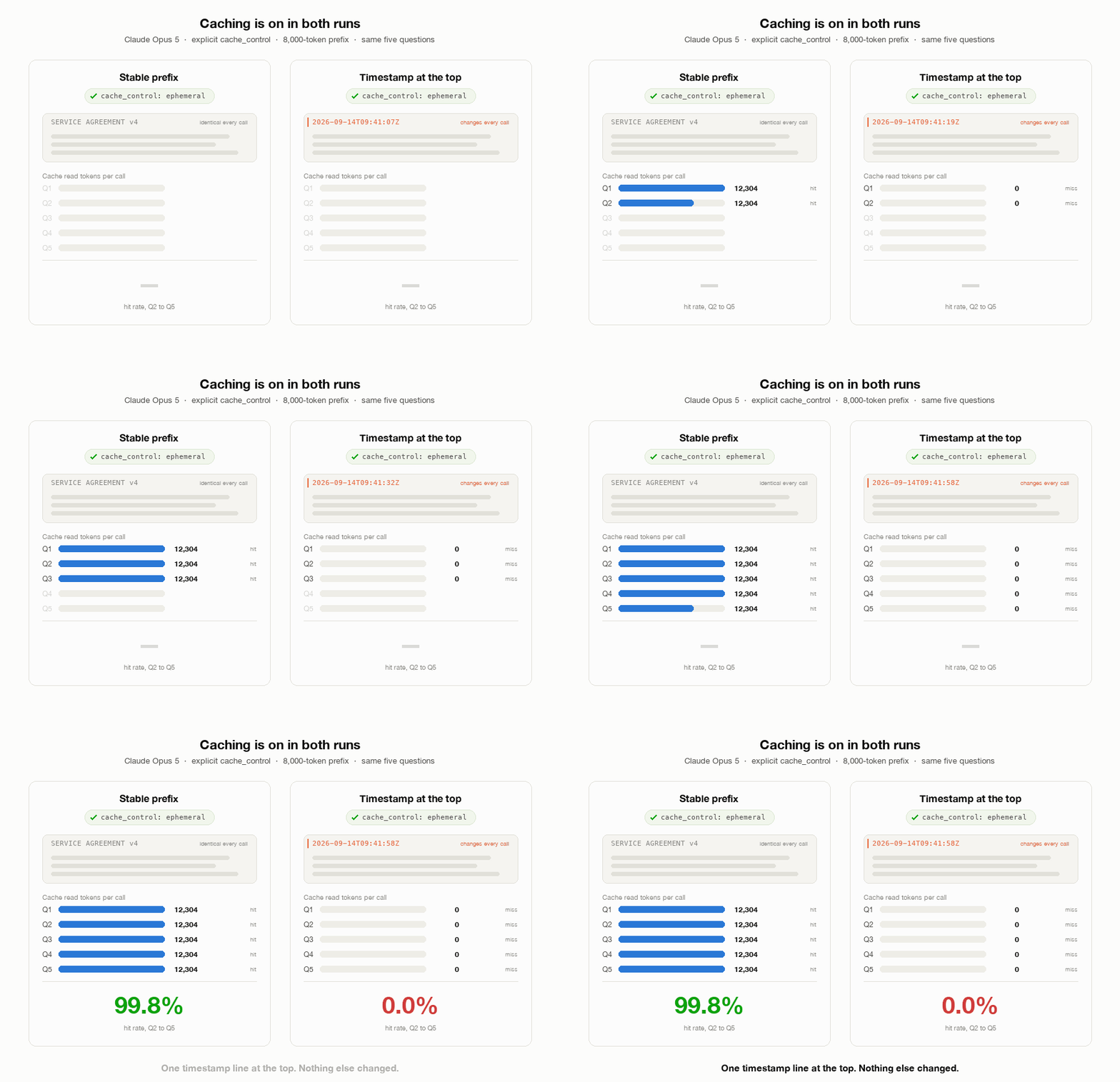
| Call | Stable cache read | Timestamped cache read | Uncached, both arms |
|---|---|---|---|
| Q1 | 12,304 | 0 | 18 |
| Q2 | 12,304 | 0 | 20 |
| Q3 | 12,304 | 0 | 25 |
| Q4 | 12,304 | 0 | 19 |
| Q5 | 12,304 | 0 | 23 |
| Hit rate, Q2 to Q5 | 99.8% | 0.0% |
Hit rate went from 99.8% to 0.0%. Nothing else changed. Q1 in the stable arm was already a read, still warm from an earlier call with the same prefix. The timestamped arm is worse than full price. Each call wrote its whole block at the 1.25x write rate and never read it back, the same shape as the automatic rows in the Claude table.
Gemini explicit against implicit
Gemini 3.8 Flash, five sizes from 5,000 to 100,000 target tokens, one five-question session per arm at each size. Implicit uses no cache object. Explicit creates a CachedContent object at a 1-hour TTL, deleted after, with one full hour of storage billed at $0.50 per million tokens since that is Gemini’s minimum. Measured is the token count of the CachedContent object.
| Target | Measured | Implicit session | Explicit session | Storage share of explicit |
|---|---|---|---|---|
| 5,000 | 4,595 | $0.0252 | $0.0150 | 15% |
| 10,000 | 9,259 | $0.0430 | $0.0182 | 25% |
| 20,000 | 18,488 | $0.0333 | $0.0273 | 34% |
| 50,000 | 46,309 | $0.0604 | $0.0515 | 45% |
| 100,000 | 92,589 | $0.1122 | $0.0952 | 49% |
Explicit was cheaper at every size, including 4,595 tokens, about 500 past the minimum. Storage is half the explicit bill at 92,589 tokens, and a single five-question session is the worst case for that charge. A service holding the object across many more calls per hour would widen the gap. The implicit column is not monotonic in size, likely from varying output length or whether implicit caching engaged. This script recorded session totals only, so we cannot separate the two.
The real lever is prefix stability, not provider choice
The most common reason caching does not save money is not the mode. It is a prefix that is less stable than you think.
A timestamp in the system prompt. JSON keys serialized in a different order on different servers. A “today’s date” line injected at the top for the model’s benefit. A user’s name in the persona block. Each of these changes the prefix on every call, and every provider’s cache is an exact-prefix match. One different byte at position 200 means nothing after position 200 can be served from cache, on any provider, in any mode.
The fix is the same everywhere. Put stable content first and byte-identical on every call. Put anything that varies after the cache boundary, or move it into a later message. Then check the usage fields on the response, cached_tokens on OpenAI, cache_read_input_tokens on Anthropic, cached_content_token_count on Gemini, and confirm the number is what you expected before you trust the dashboard.
Do that before any provider-specific tuning. In our run, one timestamp line took the hit rate from 99.8% to 0.0%, and the best mode we tested saved 55.4%.
Where this sits in AGNT5
AGNT5’s runtime applies a single caching policy across providers, so the mode selection above is a configuration decision rather than three separate integrations. The prefix-stability check is the one no runtime can do for you. If your template injects a timestamp, the usage fields will show a cache miss on every call.
References
- OpenAI, Prompt caching. https://developers.openai.com/api/docs/guides/prompt-caching
- Anthropic, Prompt caching. https://platform.claude.com/docs/en/build-with-claude/prompt-caching
- Gemini, Context caching. https://ai.google.dev/gemini-api/docs/caching (updated 2026-09-02)
- Gemini, Context caching on the legacy Generate Content API. Checked against the page above on 2026-09-14. Both agree on every model’s minimum. https://ai.google.dev/gemini-api/docs/generate-content/caching
- Google AI Developers Forum, report of an explicit cache created below the documented minimum. https://discuss.ai.google.dev/t/real-explicit-cache-limit/134499